Knowledge Base

YouQuote : FAQ

Here to Help : What Do You Need ?

YouQuote: Request a Quote Form

General FAQ's

YouQuote: Request a Quote Form, app allows your customers to easily request custom quotes. It is a feature-rich quoting tool designed for your Shopify store. This app allows your customers to add items to a quote list and easily submit their requests to the shop owner.

Some benefits of using this quoting app for your store:

  • Streamlined Communication: Facilitates direct communication between customers and shop owners, ensuring that customer needs are clearly understood.
  • Custom Quotes: Allows customers to request personalized quotes for specific products, enhancing the shopping experience.
  • Increased Customer Engagement: Encourages customers to interact with the store, fostering a relationship that can lead to increased loyalty and repeat business.
  • Efficiency in Processing Requests: Simplifies the process of managing quote requests, making it easier for shop owners to handle inquiries and respond promptly.
  • Improved Service Quality: Helps shop owners identify areas for improvement based on customer feedback and suggestions received through quotes.
  • Enhanced Product Understanding: Enables shop owners to gain insights into customer preferences and demands, aiding in inventory and pricing strategies.
  • Better Conversion Rates: By providing a personalized experience, quoting apps can help convert inquiries into sales, boosting overall revenue.
  • Flexible Pricing Strategies: Allows shop owners to offer tailored pricing based on customer needs and circumstances, making the store more competitive.
  • User-Friendly Interface: Typically features an intuitive design that makes it easy for customers to navigate and submit their requests.

These benefits collectively enhance the shopping experience, making it easier for customers to engage with the store while providing shop owners with valuable insights and tools to improve their business.

Notable features of this app include:

  • Allows customers to easily request a quote for products.
  • Customers can request a quote directly from the product details or collection page.
  • The quote list displays product details, including name, image, price, quantity, sku etc.
  • Customers can request quotes for multiple items at once.
  • Customers can enter their name, email, comments, and any custom field’s data when submitting a quote through the popup form.
  • Fully responsive design, compatibility with any device.

Key admin features include:

  • The app’s design and functionalities have been completely overhauled for a more modern, intuitive, and user-friendly experience.
  • Introduced a ‘Quick Start’ option for instant preview of sample content.
  • Option to create an unlimited number of ‘Request a Quote’ forms (Global or product specific form) with enhanced functionality.
  • Implemented functionality to hide the ‘Add to Cart’ button, Product Price, ‘Buy Now’ button. The ‘Request a Quote’ button will display when products are out of stock.
  • Launched the ‘Quote List Button’ upload feature, complete with sample buttons for easy reference.
  • Added a file upload option to the Quote Submission form, improving user experience.
  • Introduced a more comprehensive Help Center section for better support and guidance.
  • Provides the ability to add custom fields to forms.
  • The store owner can review quotes from the admin panel, create draft orders for customer, and adjust discounts and quantities as needed.
  • Easily archive quotes as needed.
  • Search and filter quote requests by date range, email, and four status types.

Advanced users can add custom CSS for further customization.

We provide the updated version to those who are already using our app. We send notifications of app updates by email or other means.

In most cases, our app can work with other extensions/themes. If there is a conflict, we will do our best to help you resolve it.

Yes! It works great on mobile devices. So if your store’s design is responsive, your clients will be able to customize from any device!

We have email support or a live chat in-app during business hours where you can contact our team directly for assistance.

We also provide a complete help center with video tutorials and many questions and answers to help you learn everything about YouQuote.

Installation FAQ

You can install YouQuote for Shopify here!

With just a couple of clicks you can be enjoying our free trial and testing our tools in your Shopify store.

Yes, YouQuote app installation video is given below:

[YouQuote app installation video]

We also provide a complete help center with video tutorials and many questions and answers to help you learn everything about YouQuote.

Please see the image shown below to enable App embeds:

[YouQuote app installation and activation video]

We have email support or a live chat in-app during business hours where you can contact our team directly for assistance.

We also provide a complete help center with video tutorials and many questions and answers to help you learn everything about YouQuote.

Feature FAQ

Yes, YouQuote app admin settings video is given below:

[YouQuote app admin settings video]

Yes, this app includes a Quick Start feature to help users easily get up and running.

[YouQuote app Quick Start video]

Yes, there is a video available that provides step-by-step instructions on how to create Request a Quote forms.

[YouQuote app Request a Quote forms video]

Please watch the video for a detailed tutorial on creating and editing custom fields.

[YouQuote app Add Custom Fields Video]

Yes, there is an option to order a draft from the admin.

[YouQuote app Draft Order video]

It has options to customize five types of buttons with preview.

[YouQuote Buttons Customize video]

Yes, there is an option to upload a Quote List button. Please watch our video tutorial for detailed instructions on how to do it.

[YouQuote Quote List Button upload video]

Follow the video to know how to add custom CSS.

[YouQuote custom CSS video]

Yes, you can create a draft order from admin quote list and send it to your customers via email with a checkout link. You can even modify your quitelist for an order.

Yes, you can add custom fields in the quote form.

You can add 6 types of Custom Fields for Submit Quote form. These are: Text Input Single Line, Text Input Multi Line, Checkbox, Radio Button, Dropdown and Multi Select Dropdown.

Please follow the instruction below:
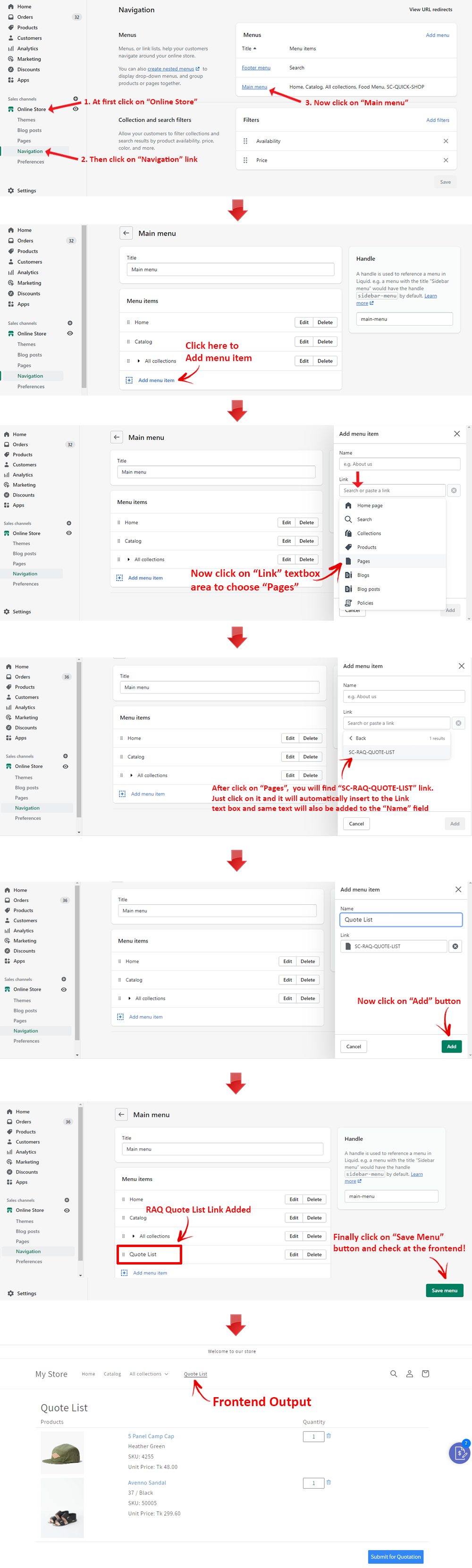
You need to add Raq Disabled Tag to the product that you do not want to allow Quote Request.

Yes, you can easily add a Request-a-Quote button on collection page. Please contact us to show the button in your desired place on the collection page.

Yes, Notification emails can be sent to Admin and Requester from the Notification Settings option.

Yes, you can enable or disable Floating Quote List Button from App Settings.

Yes, there is an option to Export all quotes from the Quote List menu.

Yes, there is a tab called Design Buttons from which you can customize all buttons.

1. From your Shopify admin, go to Apps.
2. In the row of the app Request a Quote that you want to uninstall, click Delete.
3. In the message that appears, click Delete.

Trial and Payments

Yes! We know YouQuote will exceed your expectations! Feel free to explore it before making a decision for your store. Enjoy a 10-day free trial with access to all features, and there are no restrictions on the number of products to try or orders to process.

YouQuote app is now running a 10-day free trial. You can try our app completely free for 10 days.

Recurring app charges are billed every 30-days, just like Shopify’s other apps.

Customization FAQ

Yes, customization is possible! This app can be further modified according to your needs.

For customization you can directly contact us through these emails: developres@solvercircle.com  install@solvercircle.com or shopify@solvercircle.com.

You can also contact us via live chat or through the Contact US page of our website.

It depends on the complexity of the work. If you work with Shopify, standard integrations are always included in our pricing plans. If integration with your store requires changes due to the complexity of your theme or third-party applications, a custom integration fee will apply.

Need Support?

Can’t find the answer you are looking for? Don’t worry we’re here to help!